Overview
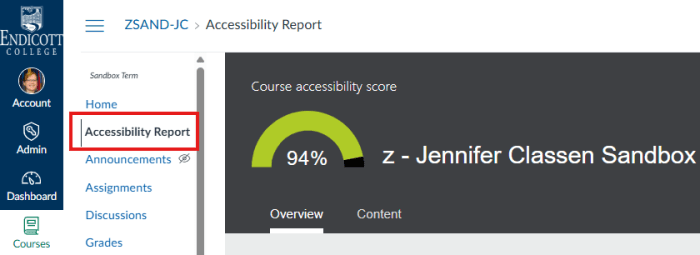
As part of its continuing commitment to accessibility and inclusion, Endicott has made available Anthology Ally (formerly Blackboard Ally) starting in the SP19 semester. Ally is a Canvas plug-in tool that uses machine learning algorithms to analyze a variety of content types against the Web Content Accessibility (WCAG) 2.0 AA Standard for web accessibility. It then provides a comprehensive report, assigns the content an accessibility score and suggests ways in which the content can be made more accessible. In other words, it scans uploaded Canvas files, provides an accessibility score and the reasons for that score, and shows you how to remediate it.
Why make your course content accessible?
- Accessibility ensures that all students can access all course materials and use them as needed.
- Adhering to the principles of Universal Design for Learning makes for a better learning experience for all students.
- Legally, Endicott is required by the Americans with Disabilities Act and the Web Content Accessibility (WCAG) 2.0 AA Standards) to make all its web content, both internal and external, fully accessible so that everyone is able to access and use these materials as required to fulfill their employment responsibilities and/or pursue their academic studies regardless of any visual, auditory, physical, speech, cognitive, or neurological disabilities.
Why Anthology Ally?
- Seamless integration with Canvas
- Easy to use, intuitive interface
- Works with multiple file types and alternative formats
- Provides institutional reporting
What you need to know about the integration:
The Accessibility Report is very easy to use and can analyze Word documents, image files, pdfs, HTML, ePublications and others. Students can choose to download one of the supported file types in a variety of alternative formats, depending on their learning styles, needs and preferences, including tagged pdf, HTML, ePub, electronic braille, audio “readings”of text and translations (50 different languages).
If you’re interested in trying Anthology Ally: Next Steps
Visit the Instructor Learning Resources to access online training and support materials.
Faculty Resources
- Faculty Assembly Powerpoint presentation : Review for more information about Blackboard Ally and the Accessibility Report in Canvas
- Microsoft Word’s Accessibility Checker: Improve your Microsoft files using their built-in Accessibility Checker.
- Adobe Acrobat Pro Accessibility Checker: Create and remediate files to be accessible.
Student Resources
- Visit the Student Resources
- Blackboard Ally creates alternative files in Canvas that are easier to use by all students.
- Alternative files include readable text for screen readers, pictures with captions, and easy to navigate content.
- Ally creates multiple alternatives from the original documents in your course. You can download these alternative formats anywhere that files are used.
- File types include: tagged pdf, HTML, ePub, electronic braille, audio and translations (50 different languages).
 EC Academic Technology