Draft Coach is a tool that lets you correct any accidental plagiarism, citations, and grammar issues before submitting your work. The extension is automatically added to all Endicott student, staff, and faculty accounts to be used.
Watch this video for more information.
How to Access Turnitin Draft Coach
To start: Open a Google Doc
- Click on “Extensions” in the top toolbar
- Select “Turnitin Draft Coach”
- Select “Turnitin Draft Coach” again on the right.
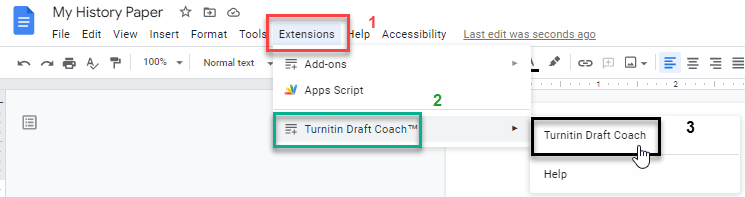
The Draft Coach toolbar will open to the right of your document

How to Use Turnitin Draft Coach while Writing
Draft Coach can check your writing for similarities to AI, citations, and grammar. See the guide for Draft Coach for more information.
Learn more about the reports from Draft Coach including Similarity Check, Citation Check, and Grammar Guide.

