Draft Coach is a tool that lets you correct any accidental plagiarism, citations, and grammar issues before submitting your work. To access it in Google Docs go to the Extensions menu.
Watch this video for more information.
How to Access Turnitin Draft Coach
- Open a Google Doc
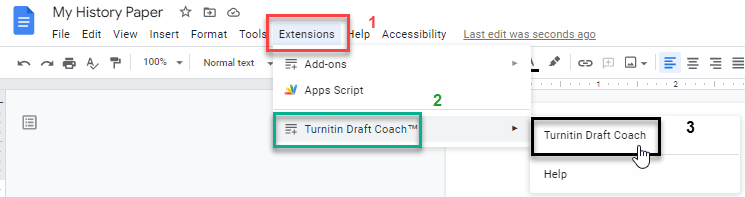
- Click on “Extensions” in the top toolbar (1)
- Select “Turnitin Draft Coach” (2) then “Turnitin Draft Coach” again to the right (3)
- The Draft Coach toolbar will open to the right of your document

How to use Turnitin Draft Coach.
 Remote Teaching Support