Canvas DocViewer is the new content preview and annotations tool that will replace the current Box previewer and Crocodoc annotation tools in Canvas on Monday, June 19.
Why is Canvas switching to DocViewer?
Canvas developed DocViewer to replace the third-party Crocodoc tool to better support customer needs. DocViewer provides a stronger technical foundation to improve existing features, and future product enhancements.
How is DocViewer different?
DocViewer supports all the same document types and the same annotation types as current functionality, with extra benefits including:
- Modern interface that looks and feels like Canvas
- Improved performance
- Fewer clicks
What does DocViewer look like?
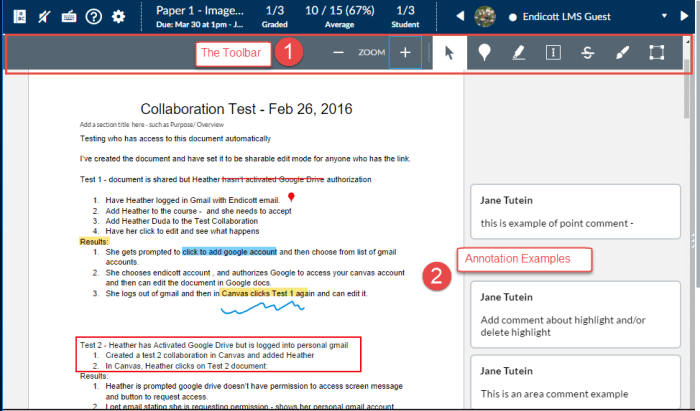
In SpeedGrader, the DocViewer toolbar displays the number of pages for a document, zoom in and out of the file, and use one of six annotation types for commenting: point, highlight, free text, strikeout, free draw, and area.
How can I learn more about DocViewer?
Read the Canvas Release: Canvas DocViewer release notes to learn more about supported file types, Annotation Tools and Known Issues.
 Remote Teaching Support